AeroAdmin4.93
Publisher Description
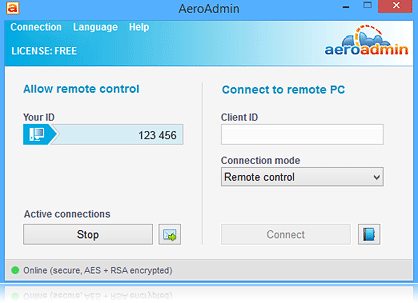
AeroAdmin is portable remote desktop software for Windows that requires no installation, registration or configuration. Download and run the same small executable on the operator and remote computers to establish a connection.
Key features include remote desktop control, unattended access, secure file transfer, clipboard and file copy/paste, remote reboot, multi-monitor support, session recording, session reporting in commercial licenses, branding and customization options, and encrypted AES + RSA connections.
AeroAdmin can connect computers behind NAT and can also use direct IP connections. It is suitable for spontaneous and regular technical support, remote administration, remote offices and other remote access tasks.
AeroAdmin is available free with usage restrictions. PRO, BUSINESS and CORPORATE licenses provide additional features and higher usage limits.
About AeroAdmin
This Remote Computing program is available in English, German, French, Italian, Spanish, Portuguese, Dutch, Polish, Russian, Turkish, Korean, Japanese, Arabic. It was last updated on 29 October, 2026. AeroAdmin is compatible with the following operating systems: Windows.
The company that develops AeroAdmin is AeroAdmin LLC. The latest version released by its developer is 4.93. This version was rated by 28 users of our site and has an average rating of 4.6.
The download we have available for AeroAdmin has a file size of 2.1 MB. Just click the green Download button above to start the downloading process. The program is listed on our website since 2026-09-01 and was downloaded 2,358 times. We have already checked if the download link is safe, however for your own protection we recommend that you scan the downloaded software with your antivirus. Your antivirus may detect the AeroAdmin as malware if the download link is broken.
How to install AeroAdmin on your Windows device:
- Click on the Download button on our website. This will start the download from the website of the developer.
- Once the AeroAdmin is downloaded click on it to start the setup process (assuming you are on a desktop computer).
- When the installation is finished you should be able to see and run the program.
Program Details
General
System requirements
Download information
Pricing
Version History
version 4.93
posted on 2026-09-01
Added full file copy and paste support (Ctrl+C / Ctrl+V); screen recording now works without manual recorder installation and verifies the recorder with SHA-256 before launch; fixed Run as Administrator and UAC control; fixed incorrect main-window display on exit; stability improvements and bug fixes.
version 4.92
posted on 2026-06-23
Removed the user rights elevation popup for non-admin clients; added private router settings and new CORPORATE customization options.
version 3.2
posted on 2015-06-13
- File transfer
- Unattended access
- Parallel sessions
- Auto update
- Branding and access rights preconfiguration
- Ticket sending system
